
Twitter Video Downloader
Save videos and GIFs from X as MP4. Free, no sign-up.
No added watermark · HD when available · No app needed
How to Download Twitter Videos

1Copy the post link
To save Twitter videos, open the individual post in X and select Share, then Copy link. In a browser, you can also copy its address. Use the post containing the clip, not the author’s profile.

2Find the video
Paste into the Twitter video downloader and select Get Video or press Enter. If clipboard access is blocked, paste manually. Expand Preview video if you want to check the clip before saving.
3Choose and save
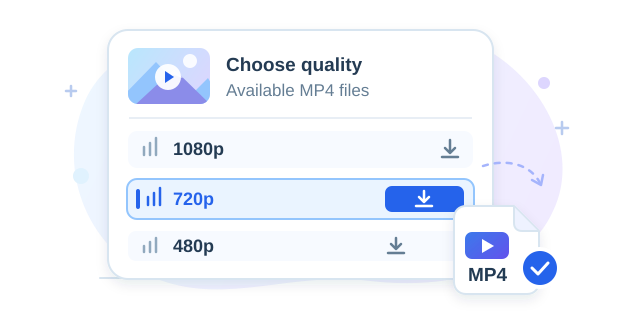
Select Download beside your chosen resolution, then check your browser’s download list. To download Twitter videos from another post, select Download Another and paste the next link. No page refresh is needed.
When Saving a Video Is Useful

Watch a clip offline
Download Twitter videos before a journey while you have a reliable connection. Replay the saved MP4 without loading the post again, even in places with limited reception.
A smaller file saves data. Preview it to check that important details are readable.

Back up your own posts
Use the X video downloader to keep your published demos, project updates or event clips. Give files descriptive names so you can find them without searching your timeline.
Keep original recordings too: X’s version may differ from the file you uploaded.

Keep a useful reference
Save Twitter videos you have permission to download, such as tutorials or demonstrations. Pause and replay the file while following the steps or checking a particular detail.
Keep the post link for the creator’s explanation, attribution and later updates. The MP4 does not include the post’s written explanation or replies. Save that context separately if it matters for your reference.
Save Videos on iPhone, Android and Desktop
iPhone and iPad
After you download Twitter videos on iPhone, check your browser’s downloads or the Files app. If a player opens instead, look for its share or save options. Files do not always appear in Photos automatically; available actions depend on your browser and iOS version.
Android phones and tablets
Check your browser’s download notification or the Downloads folder in your file manager. A saved MP4 may not immediately appear in your gallery. Open it directly from the file manager before assuming the download failed or starting another request.
Windows and Mac
Your browser saves the file to its default download folder or asks you to choose a destination. Find the MP4 in the download history and open it with a compatible player. Rename the file if you want to identify it easily later.
Video Quality, MP4 and GIF Downloads
Choose the file that fits your purpose before starting a Twitter video download.
| Your goal | What to choose |
|---|---|
| Read small details | Choose a higher resolution for text, demonstrations or a larger screen. |
| Use less data | Choose a smaller file to save storage and mobile data. |
| Save a GIF post | Download X videos from animated posts as MP4, not .gif images. |
| Find an HD version | Check the listed options. HD depends on the source; the tool does not upscale. |
1080×1920 describes a vertical video’s width and height, not “1920p.” The Twitter video downloader adds no watermark; existing logos and captions stay in the file.
Supported X and Twitter Links
To download videos from Twitter, use a public post containing a video or animated GIF. Profile pages, search results and posts containing only text or photos do not provide a downloadable clip.
Recorded audio conversations use a different format. For a Space replay, open the Space downloader. The FAQ below lists supported domains and explains where to copy a post link.
Why a Twitter Video Download May Fail
The link is not accepted
The Twitter video downloader needs a complete post address, not a profile or search page. Open the individual post and copy its link again.
No downloadable video appears
Open the original post in X. It may contain only images, or its media may be unavailable. Try a different public video post to check whether the problem is specific to that link.
The lookup fails temporarily
If you cannot download videos from Twitter despite a valid link, wait a moment and retry. A temporary source error or busy service can interrupt the lookup; repeated rapid submissions may not help.
The file does not finish saving
Check your connection, free storage and browser download history. Retry with a smaller version if available. Clicking Download starts a request; it does not confirm the entire file was saved.
Frequently asked questions
Which video links are supported?
The Twitter video downloader accepts public post links from x.com and twitter.com, including their www and mobile versions. A link should identify a post, such as https://x.com/user/status/123456789. Sharing parameters can stay attached. Facebook links, including fb.com, are not supported.
Where do I find the video link?
In the X app, open the post, tap Share and choose Copy link. In a browser, open the individual post and copy its address, or use its Share menu. If someone sent you a link, open it first to check that it leads to the intended video.
Why are there several video quality options?
X can process an uploaded video into versions with different resolutions and bitrates for different devices and connection speeds. The X video downloader lists the available MP4 versions of that clip. The choices depend on the source; not every post has every resolution or an HD option.
Which video quality should I download?
Choose the highest listed resolution when detail matters more than file size. For the same clip, higher-quality versions usually have larger files and take longer to download on the same connection. If you only need a quick reference, a smaller version may be enough. Compare the actual sizes shown; download time also depends on your connection speed.
Is this Twitter video downloader free?
Yes. There is no paid plan or registration requirement. Availability depends on the source and service capacity, so temporary limits or errors are possible during busy periods.
Do I need an X account?
You do not sign into X through this website. You need a link to a public video post; access requirements when browsing X itself may differ.
Can I save Twitter videos from private accounts?
No. This tool does not bypass account privacy or recover deleted posts. Being able to view a protected post in your own account does not make it publicly downloadable here.
Can I download only the audio?
Yes, use the Twitter to MP3 converter linked above for audio from a video post. The finished MP3 is created in your browser, and conversion time depends on your device and the clip.
Can I download multiple posts at once?
The form processes one post link at a time. Use Download Another after each result to start again. Bulk lists, complete timelines and entire account archives are not supported.
Does this tool download Spaces?
For an audio conversation, use the separate Space downloader linked above. It needs an available recorded replay; a live Space without a replay is not a downloadable video post.
Only save content you own or have permission to download. This service is independent of X Corp. See our privacy policy for information about analytics and request data.